Analytics that answer real questions
Real-time dashboards, agent scorecards and scheduled reports — without spreadsheets.
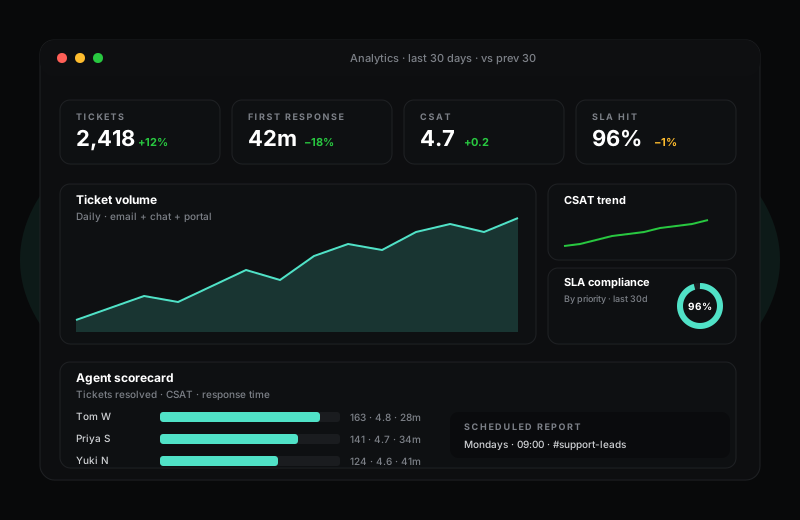
HelpWise reports on every dimension you would build manually: ticket volume, response times, CSAT, agent performance, SLA compliance, channel mix. Filter by date range, drill from a chart down to the underlying tickets, and schedule the dashboard to email itself to your manager every Monday morning.
14-day Pro trial · no credit card required
What you get
Everything in Analytics, on every paid plan
- Real-time dashboard with ticket volume, response and resolution times, CSAT and SLA
- Per-agent scorecards — open tickets, mean response time, CSAT, SLA hit rate
- Channel mix and trend charts — see when chat overtakes email and plan for it
- Customisable date ranges with built-in comparison to the previous period
- Drill-down — click any chart segment to open the underlying ticket list
- CSAT trends with comment-level breakdown — read the verbatims, not just the score
- Scheduled reports — daily, weekly or monthly, delivered as email or Slack message
- CSV exports of any view for your finance team or BI pipeline
Dashboards that match how you actually run a team
The default HelpWise dashboard is the dashboard most support managers build themselves on day three of using a new tool. Volume on the top, response times in the middle, CSAT on the right, agent scoreboard at the bottom. You can pin filters, save custom views, and schedule the whole thing to email itself to your team lead every Monday at 9am.
Behind the dashboard there is a queryable data model — agent, customer, company, ticket, channel, tag — that you can slice from any direction. If you want to know "what is the CSAT for tickets where the customer is on the Enterprise plan, raised by chat, in Q1, by agent group" — that is a few clicks, not a JIRA ticket to your data team.
Scorecards without the awkward conversations
Agent scorecards in HelpWise are designed to be reviewed by the agent, not just by the manager. Each scorecard shows the agent's open queue, their CSAT trend, their response time relative to the team average, and the macros they used most this week. Most managers find the conversation with an underperforming agent goes very differently when both sides are looking at the same numbers.
SLA compliance is reported separately. The platform calculates first-response, next-response and full-resolution SLAs based on your business hours and the customer's priority. You see compliance percentage by priority, by channel, by agent — useful when a single bad day is dragging down a quarterly target and you want to know exactly which conversations to course-correct.
Frequently asked questions
Things people ask before signing up
Can I export raw ticket data for our BI tool?
Are the dashboards real-time?
Do you support custom report builders?
Try Analytics on a 14-day free trial
Sign up in under a minute. No credit card. Cancel any time. If HelpWise does not save your team time, do not pay us.