Ticket management built for teams that ship
A clean queue, real SLAs and an audit trail you can actually use.
HelpWise turns every email, chat, portal submission and API call into a structured ticket — with priority, status, owner, custom fields and a full conversation history. Your agents stop hunting through inboxes and start solving problems.
14-day Pro trial · no credit card required
What you get
Everything in Ticket Management, on every paid plan
- Multi-channel intake from email, live chat, the customer portal, REST API and webhooks
- Custom fields, tags, statuses and priority levels you define
- Saved views and shared queues so each agent sees their work first
- Bulk operations — assign, tag, status-change, merge — across hundreds of tickets at once
- Linked tickets (related, blocks, parent/child) keep complex investigations connected
- Full activity timeline with audit trail for every change
- Collision detection so two agents never reply at the same time
- Reusable ticket templates and macros that drop in a one-click answer
A queue your team will actually use
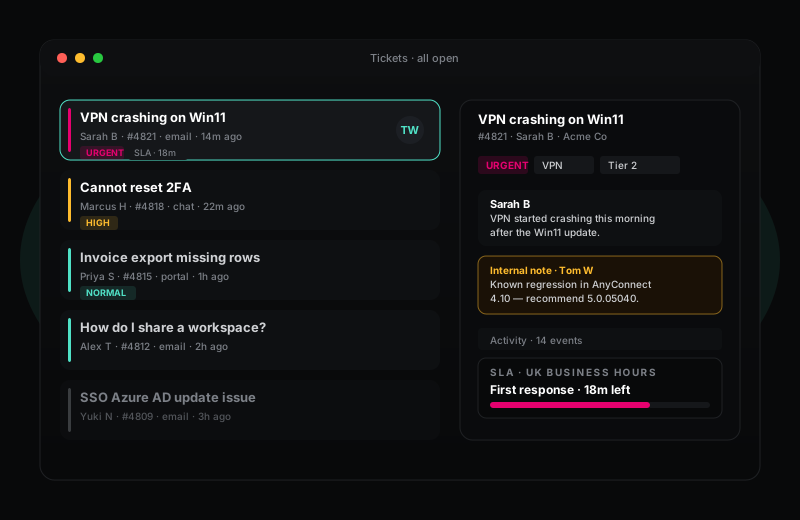
Most ticketing systems get something basic wrong: agents have to dig to find their work. HelpWise puts the most useful queues — your queue, SLA breaches, customer waiting, recently updated — at the top of the sidebar with live counts. The default views are the views you would have built yourself on day three.
Underneath, ticket data is structured so your team can slice it any way that matches how your business works. Every field can be required, optional, or only-for-some-priorities. Macros run when an agent triggers them; automations run automatically. The result is a queue that stays clean even when 200 tickets hit on a Monday morning.
SLAs, audit trail and the boring parts done right
SLA policies in HelpWise pause overnight when business hours close, account for the customer's time zone, and let you set different commitments per priority and per channel. When a ticket is at risk, the queue colour-codes it red and an automation can escalate, reassign, or @-mention a manager — all of it without writing custom code.
Every change to a ticket — status update, owner change, custom-field edit, message sent, internal note left — lands in the activity timeline with the agent name and timestamp. That same data feeds the audit log on Enterprise plans, so when an auditor asks "who edited this ticket on Tuesday at 14:32?" you have a precise answer in five seconds.
Frequently asked questions
Things people ask before signing up
Can I migrate tickets from Zendesk, Freshdesk or Help Scout?
How does HelpWise handle ticket merges?
Is there a limit on tickets, agents or storage?
Try Ticket Management on a 14-day free trial
Sign up in under a minute. No credit card. Cancel any time. If HelpWise does not save your team time, do not pay us.